8 min read

Paradee: Distilling a voice model to one-tenth its size

What I learned shrinking Kokoro-82M into an 8M-parameter voice model that runs on a CPU.

A couple of weeks ago I released Chickadee, an open-source Chrome extension that reads web pages aloud. It runs entirely on your own computer and it’s completely free. I built it because I wanted a quick and easy way to have the browser read to me that’s free and that I could trust wouldn’t share my data.

The voice model I used for Chickadee is Kokoro-82M, an open text-to-speech model. The first time I heard it, I was almost taken aback at how natural a model under 100 million parameters could sound. Here it is reading a sentence out loud from the Wikipedia page for chickadees:

Mountain chickadees can hide as many as 80,000 individual seeds each, which they retrieve during the winter.
Kokoro82M

But running Kokoro inside a browser is still very resource intensive. The model download takes up 310 MB, and it needs WebGPU, which many laptops don’t support well. Even on machines that it can run on, it consumes a lot of resources.

Around the same time as I was releasing Chickadee, I was beginning to grow interested in model distillation, a technique that trains a smaller student model to approximate a larger teacher model’s performance. I wanted to see if I could distill Kokoro into a smaller model that I could ship with Chickadee and that could easily run on any device. Another insight I had is that while Kokoro is able to produce audio for many voices, I could limit the smaller model to just one voice to further save on size. In a way, this is an example of domain-specific distillation.

The result is Paradee, an 8M parameter voice model distilled from Kokoro that sounds like Kokoro’s af_heart voice at about a tenth of the size. Here are both of them reading a line from Wikipedia’s page on black-capped chickadees.

Males and females are generally similar, although males have a larger bib.
Kokoro82M
Paradee8M

As you can hear, they’re not identical. If you put them side by side, Kokoro is still a little cleaner. On its own though, Paradee is easy to listen to and very natural sounding for a model its size.

Here is a quick comparison of Kokoro and Paradee:

Kokoro-82MParadee
Parameters82M8M
File size325 MB9 MB
Naturalness score (out of 5)4.524.41
Words misheard5.7%6.0%

These are measured on 200 held-out sentences. The naturalness score comes from UTMOS, a model trained on human ratings that predicts how natural a clip sounds. “Words misheard” is how many words Whisper, a speech recognition model, gets wrong when it transcribes the audio.

A brief background on how Kokoro works

Kokoro can largely be split into two halves, a text side and an acoustic side (or decoder). I take advantage of this two component architecture when distilling the student model, but more on that later.
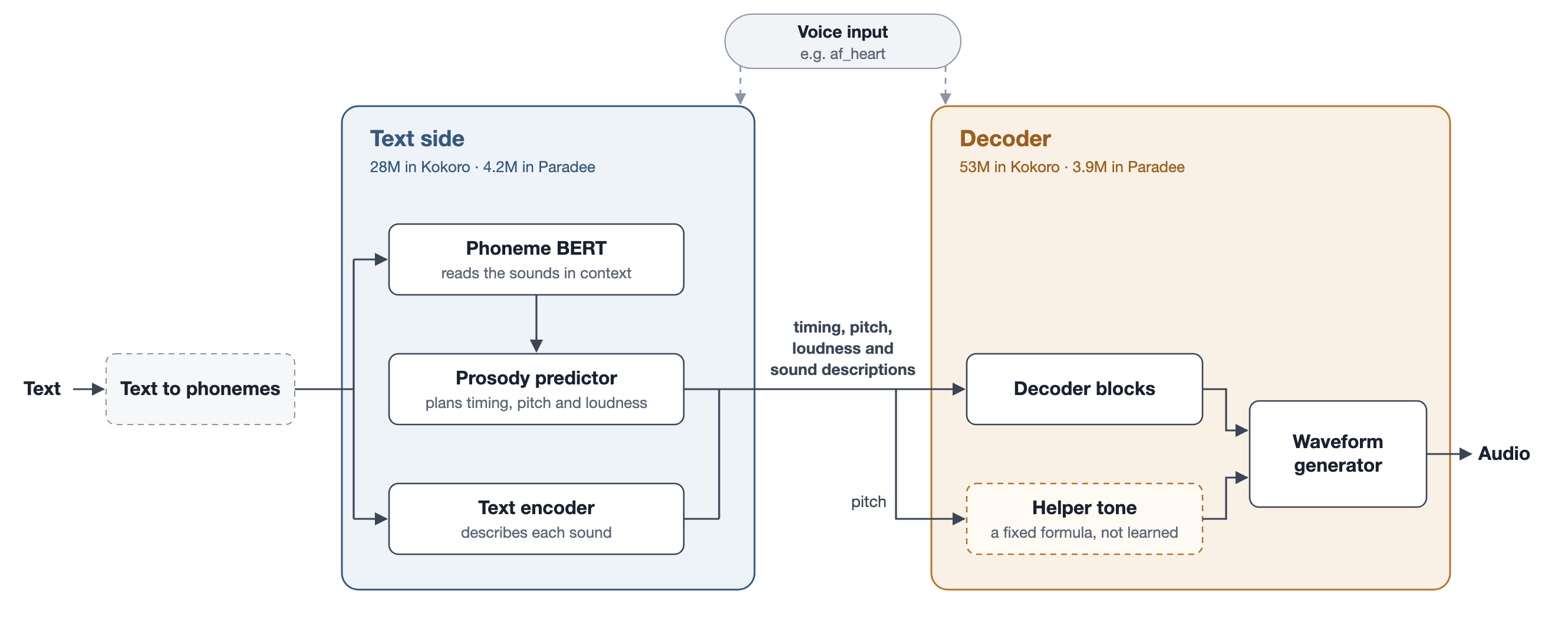
Kokoro's architecture. Text becomes phonemes, the text side produces timing, pitch, loudness and feature encodings, and the decoder turns those and a helper tone into audio.

Here is an overview of how Kokoro turns text into speech. First, a library called misaki turns the text into phonemes, the individual sounds of speech. “Males” becomes something like “mˈAlz”. Misaki mostly looks words up in a pronunciation dictionary. It isn’t part of Kokoro’s 82M parameters, and Paradee uses it unchanged. From then on, Kokoro only works with phonemes.

The text side (28M parameters) reads the phonemes and works out how to say them. It decides how long to hold each sound, how the pitch should rise and fall, and how loud each sound should be. It also produces a 512-dimensional feature encoding for each phoneme.

The decoder (53M parameters) turns the timing, pitch, loudness and feature encodings into audio, in two stages. First, each phoneme’s features are stretched to its predicted length, and the decoder blocks combine them with the pitch, loudness and voice into one representation per frame. Then the waveform generator upsamples those frames into 24,000 samples of audio per second. To make voiced sounds easier, Kokoro also precomputes a helper tone from the predicted pitch, using a fixed formula rather than anything learned. The waveform generator uses this tone as an extra input alongside the frames. The waveform generator is a convolutional network that gradually upsamples the frames and predicts a spectrogram. For every frequency at every moment, the spectrogram holds two values: the magnitude is how loud that frequency is, and the phase is where its wave is in its cycle. A fixed inverse Fourier transform then turns that spectrogram into the sound wave.

Here’s Kokoro going through each step for the chickadee sentence. Scroll to follow it through.
Step 1 · Text

It starts with a sentence

This is the line from Wikipedia's page on black-capped chickadees. Neither Kokoro nor Paradee saw it during training.

Step 2 · Phonemes

The words become sounds

Misaki turns the text into phonemes. “Males” becomes something like “mˈAlz”. From here on, Kokoro only works with phonemes.

Step 3 · Text side

How long to hold each sound

The text side reads the phonemes and decides how long each one lasts. Laid end to end, they become the timeline for everything that follows.

Most sounds get 25 to 100 milliseconds. The last sound before the comma is held for about a quarter of a second.

Step 4 · Text side

Where the pitch goes, and how loud

Next it predicts how the pitch rises and falls, and how loud each moment should be. The gaps in the pitch line are sounds like “s” and “f”, which have no pitch.

Step 5 · Text side

What each sound should be

It also produces a 512-dimensional feature encoding for each phoneme, stretched to fit how long the phoneme lasts. Here are 96 of the dimensions, one row each.

The timing, pitch, loudness and feature encodings are everything the decoder gets from the text side.

Step 6 · Decoder

A helper tone to start from

The decoder builds a simple tone from the predicted pitch and its first eight overtones, using a fixed formula. Each bright line is one of them.

For this voice, the tone stops around 2 kHz. Above that line, the decoder has to make the sound on its own.

Step 7 · Decoder

The final audio

The decoder combines the tone with the text side’s outputs to make sound, 24,000 samples every second.

The waveform generator at its very end does 89% of all of Kokoro’s arithmetic, which is why the decoder mattered most for making Paradee fast.

→
→
→
→

How I distilled Kokoro into Paradee

Paradee is the same design as Kokoro, but with every layer made much smaller. I trained it using distillation. That is, I trained a small student model to reproduce the outputs of a larger teacher model. Kokoro’s two halves made it possible to do this more efficiently, since I was able to distill each half separately.

Kokoro-82M, the teacherPhonemesKokoro text side28M parameterstiming, pitch, loudness,feature encodingsKokoro decoder53M parametersAudiotrained to matchKokoro’s outputstrained to matchKokoro’s audio, givenKokoro’s text side outputsPhonemesStudent text side4.2M parameterstiming, pitch, loudness,feature encodingsStudent decoder3.9M parametersAudioParadee, the student

The student’s text side has the same three components as Kokoro’s, but each layer is about a third as wide, which brings it down to 4.2M parameters. Similarly, the student decoder is about a quarter as wide, at 3.9M parameters. Since Paradee only needs to produce one voice, I also removed the voice input and replaced it with a single learned vector.

To build the training data, I had Kokoro read 12,000 sentences, about 24 hours of audio. For every sentence, I saved the phonemes, everything Kokoro’s text side produced (the length of each phoneme, the pitch and loudness curves, and the feature encodings), and the final audio.

Each half of the student was distilled in isolation. The student text side takes the phonemes as input and tries to predict the text side output (length, pitch, loudness, and feature encodings). Training it is straightforward, since I can compare each prediction directly against Kokoro’s saved values. Similarly, the student decoder is given Kokoro’s own lengths, pitch, loudness and feature encodings as input, and it has to produce Kokoro’s audio from them. Once both halves were trained, I connected them, with the student text side feeding the student decoder, and they worked together without any extra training.

All the training was done on my MacBook Pro over about 30 hours of compute. For comparison, Kokoro’s authors trained it with about 1,000 GPU-hours on A100s.

Distilling the decoder, and getting it to sound right

Shrinking the text side was relatively straightforward. The decoder was much more troublesome.

Step 1

Kokoro’s spectrogram

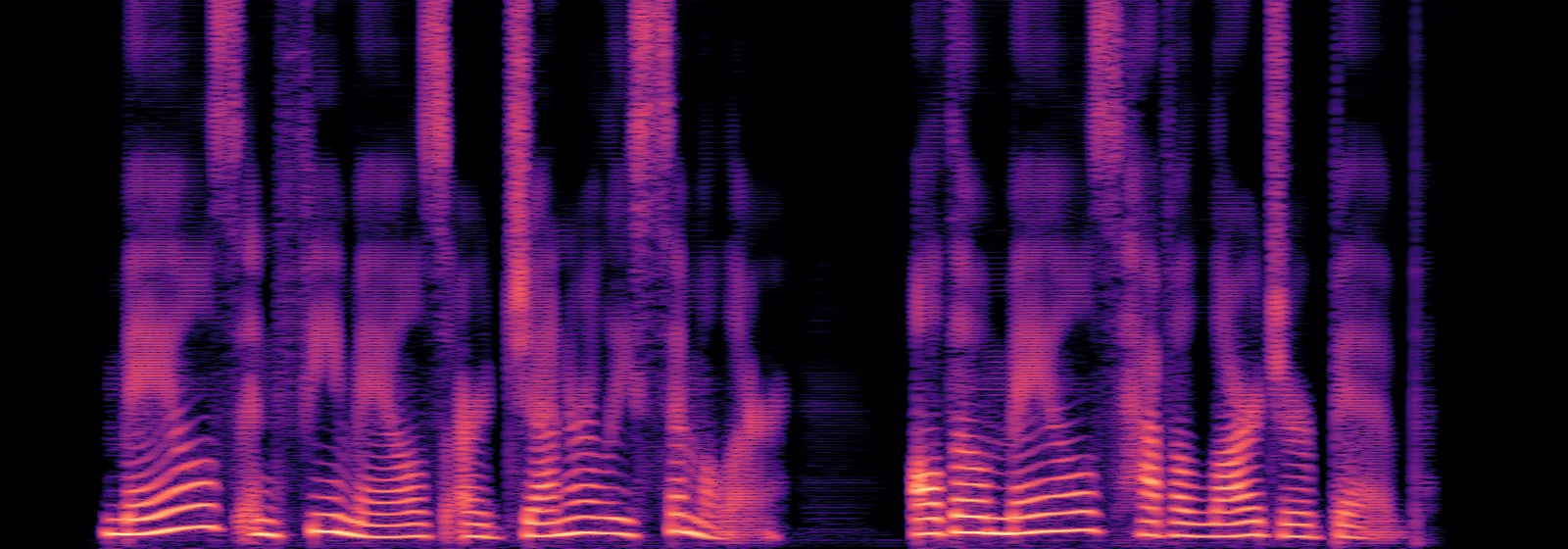
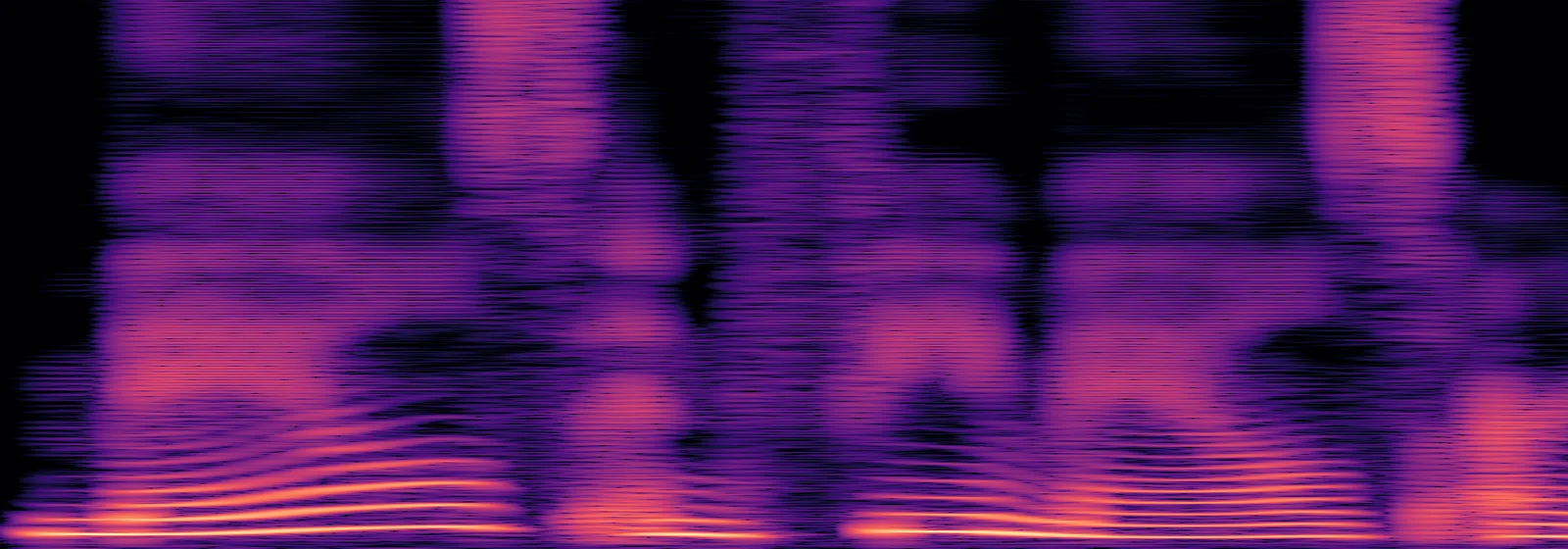
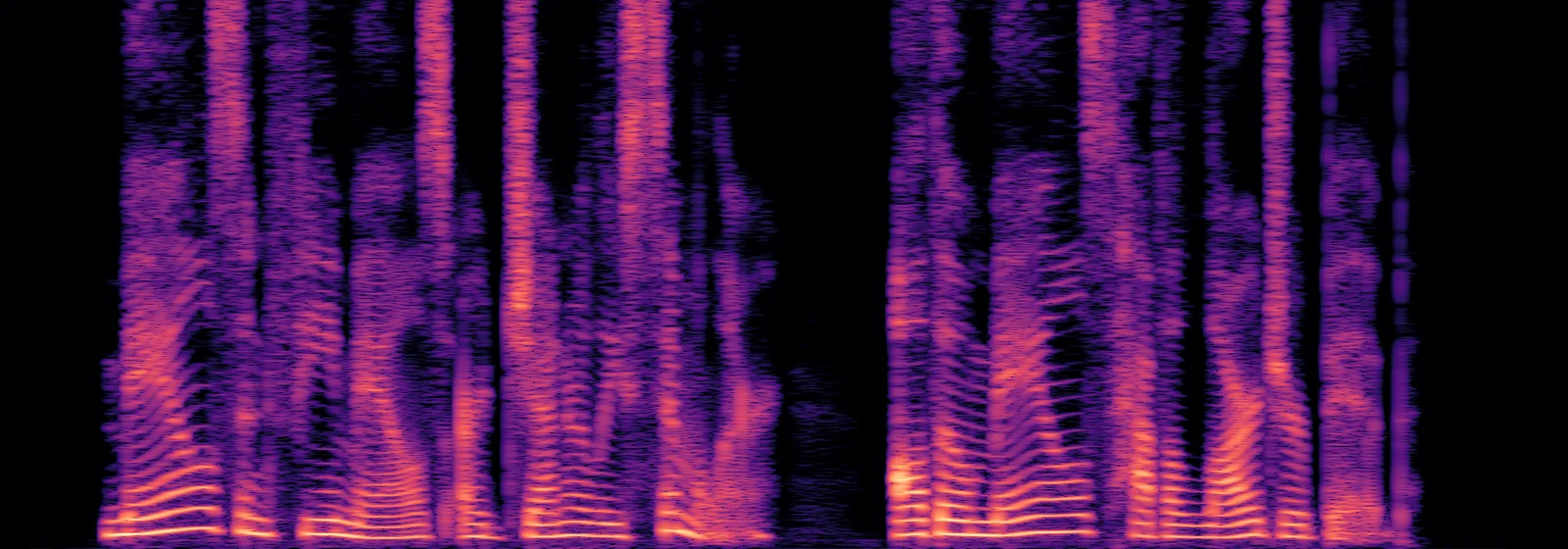
The first student decoder learned only by comparing its audio’s spectrogram with Kokoro’s. A spectrogram is a picture of sound. Time goes left to right, frequency goes up, and brighter means louder. Here’s Kokoro saying the sentence.

Kokoro82M

The thin bright stripes at the bottom are the harmonics of her voice. The dashed line at 2 kHz matters here. Below it, the decoder has the helper tone to work from. Above it, the decoder has to make the sound completely on its own.

Step 2

The first student decoder

My first student decoder was not great. It sounded like the right voice with a creepy robot talking at the same time.

First student decoder

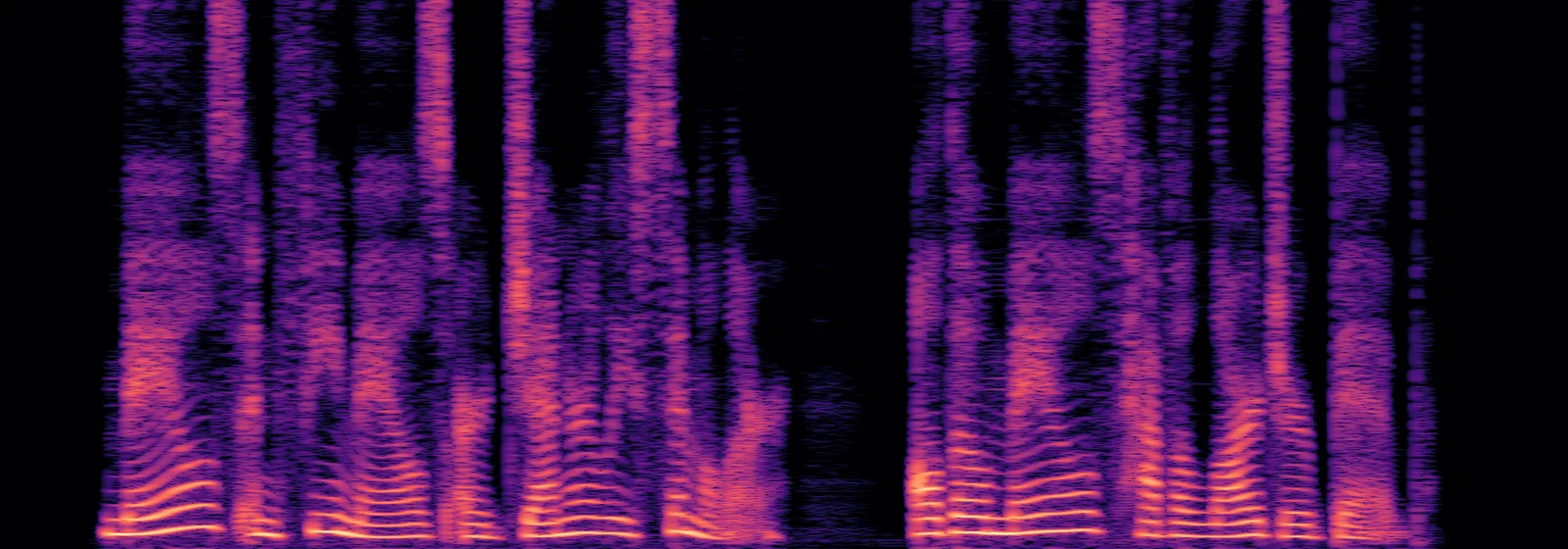
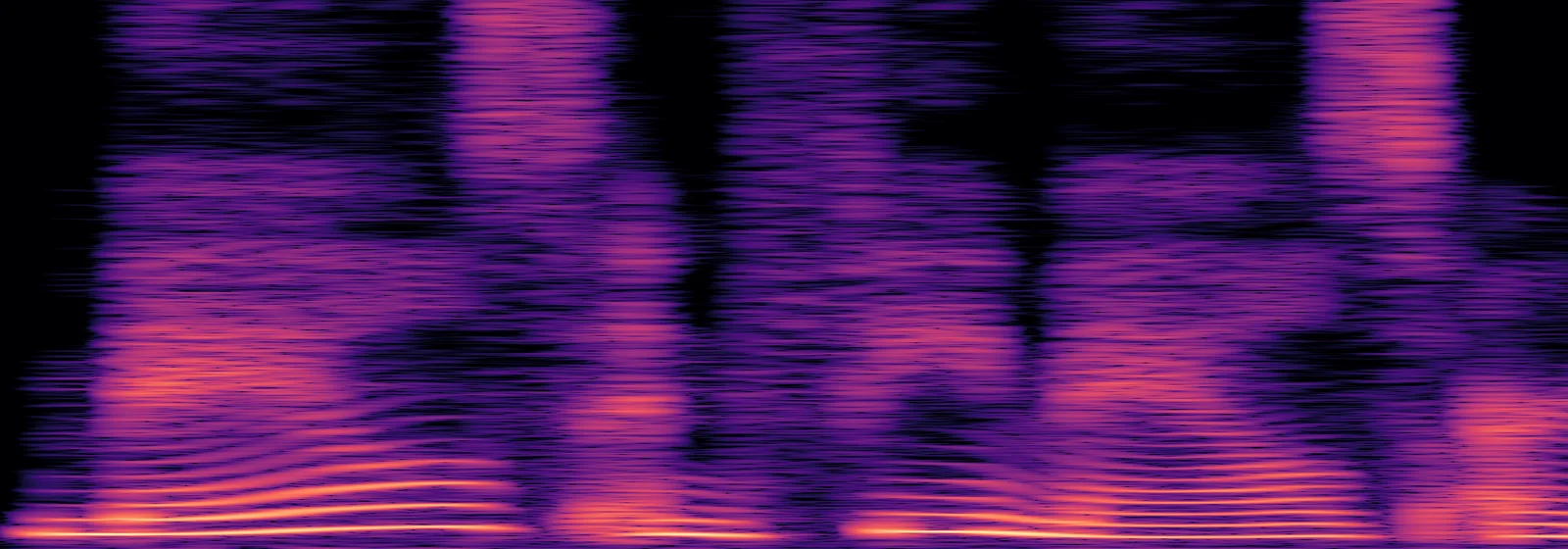
Here’s the spectrogram that first student decoder produced. Below the 2 kHz line it looks a lot like Kokoro. But above the line, if you look closely, it’s smooth and blurry where Kokoro’s is discrete and detailed.

Step 3

Adding a discriminator

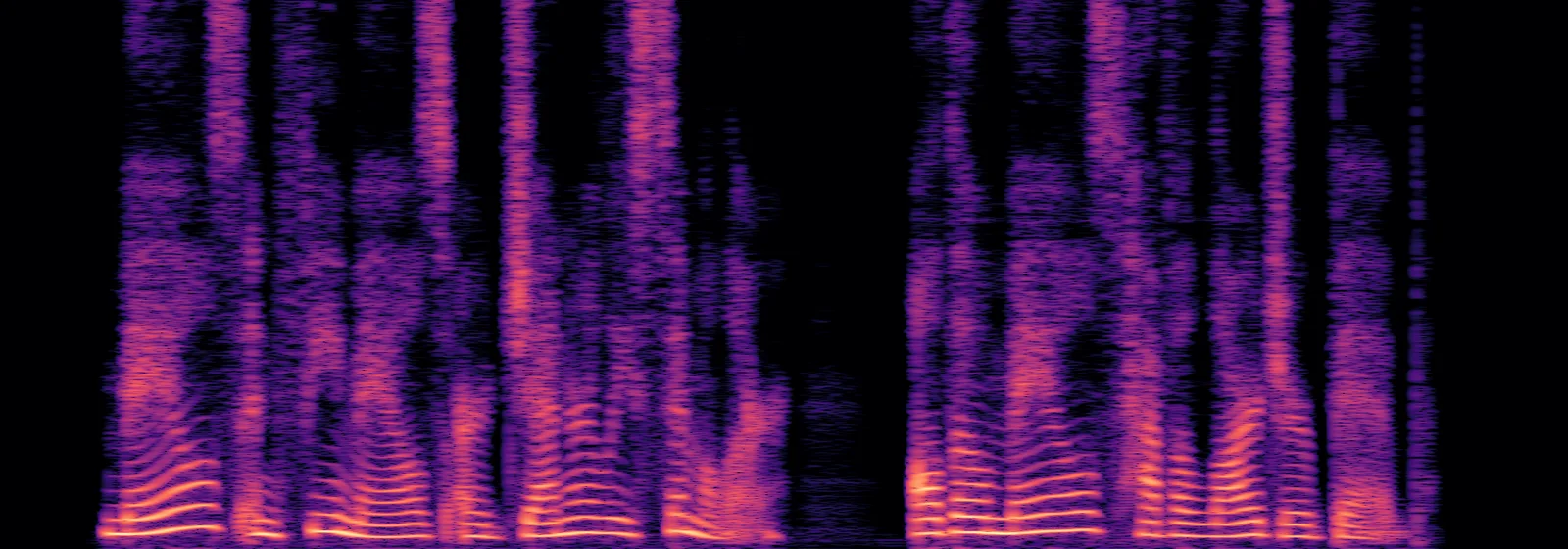
I then tried adversarial training. A second small network, the discriminator, tries to tell Paradee’s audio apart from Kokoro’s, and the decoder learns to fool it. With it, the UTMOS score went from 3.0 to 4.4. Even after that, though, there was still a slight buzz.

With the discriminator

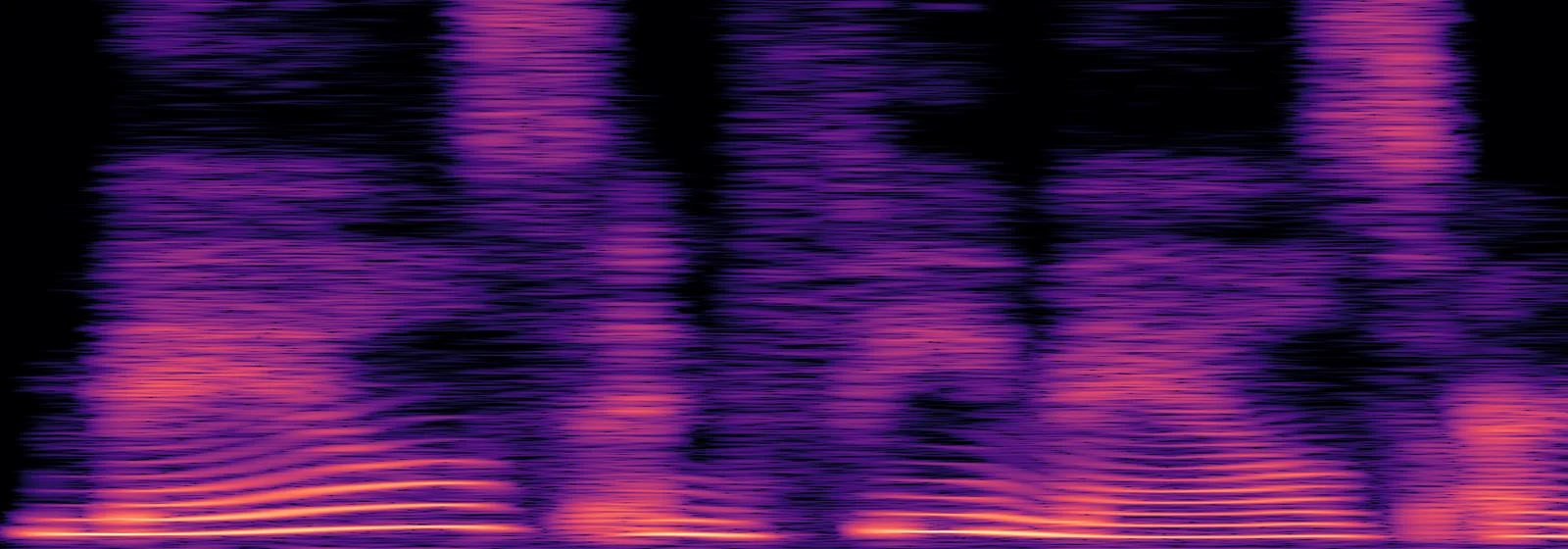
You can see that above 2 kHz, the spectrogram looks a bit less blurry than before.

Step 4

Finding where the buzz comes from

At this point, I was beginning to get stuck trying to train the model more. Instead, I decided to isolate where the buzz was coming from. I created an audio sample that had the student’s magnitudes (how loud each frequency is) but the teacher’s phase. That got rid of the buzz, which means the student audio’s phase was the issue.

I then applied the teacher’s phase to different frequency bands, and found that fixing the phase between 2 and 8 kHz alone was enough to remove the buzz. That’s right above where the helper tone stops.

Step 5

Adding a phase filter

Instead of continuing to try to train the buzz away, I decided to use a phase filter, which corrects the phase in that range after the audio is generated, using the helper tone as a reference. It compares the phase of the generated audio with the helper tone, smooths out the differences, and rebuilds the audio with the corrected phase. That managed to remove most of the buzz.

Paradee8M

The whole progression is in the panel, from the first small decoder to the final Paradee. Flip through the stages and watch the lines above the helper tone line go from blurry to more defined as the buzz is progressively removed.

→
→
→
Kokoro, the teacher
Spectrogram of Kokoro, the teacher
With Kokoro’s phase in this band, 2 to 8 kHz, the buzz goes away
helper tone stops here

Paradee has 8M parameters, fits in a 9 MB file, and runs about 18 times faster than real time on a single CPU core. It scores 4.41 on UTMOS against Kokoro’s 4.52. There’s still a slight buzz on some stressed syllables if you listen for it, so there is certainly still room for improvement. But for a model a tenth of the size, it sounds quite natural compared to alternatives.

Paradee in Chickadee

The next version of Chickadee has a new option called “Paradee — light.” Paradee comes built into the extension, so there’s nothing to download, and it works on computers where Kokoro can’t run.

Try it

Install Chickadee, choose Paradee as the voice model, and have it read out a web page.

Alternatively, you can try it directly through Python:

pip install git+https://github.com/sahilmahendrakar/paradee
python -m paradee "Paradee is a small voice that runs anywhere." -o hello.wav

The code, including everything I used to train it, is on GitHub, and the model and more samples are on Hugging Face. It’s open source under Apache 2.0, the same license as Kokoro.

A complete technical write up can be found in Paradee: Distilling Kokoro-82M into an 8M-Parameter Single-Voice Text-to-Speech Model.